
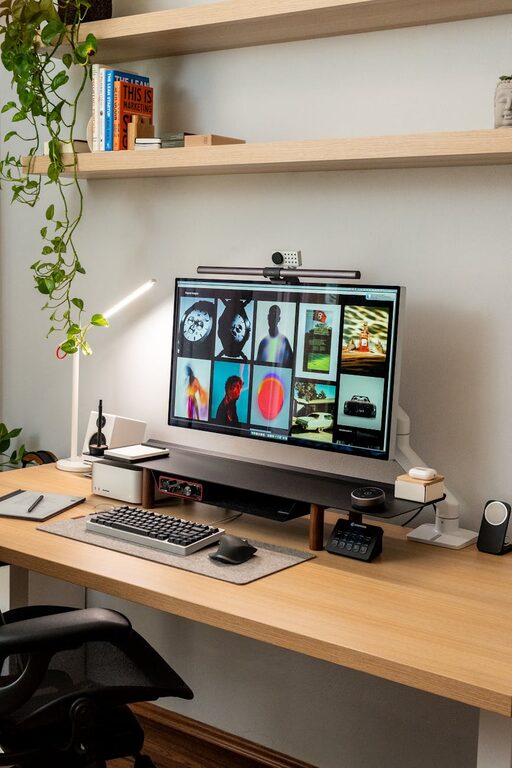
Creating a home workspace that’s both cozy and productive can significantly improve your work-from-home experience. Whether you’re working remotely full-time or just need a dedicated spot for occasional tasks, a well-designed workspace helps you stay focused and comfortable throughout the day. In this post, we’ll explore practical tips to design a home office that fosters creativity, reduces distractions, and keeps your energy levels up.
Why a Cozy Workspace Matters
Spending long hours working in an uncomfortable or cluttered space can lead to decreased productivity and even impact your well-being. A cozy workspace feels inviting and calm, encouraging you to spend time there and focus on your tasks without distractions. Combining comfort with functionality is key to maintaining motivation and efficiency.
Choose the Right Location
Consider natural light
Pick a spot in your home with plenty of natural light. Sunlight helps regulate your circadian rhythm and lifts your mood. Position your desk near a window if possible, but avoid glare on your computer screen by adjusting blinds or curtains.
Minimize noise and distractions
Find a quiet area or use noise-cancelling headphones to block out household sounds. If you share your space with others, try to mark your workspace clearly so family members or roommates respect your focus time.
Invest in Comfortable, Ergonomic Furniture
Ergonomic chair and desk
Invest in an adjustable chair that supports your back and promotes good posture. Pair it with a desk that suits your height and allows you to maintain a comfortable arm position while typing.
Consider sit-stand options
If possible, try a sit-stand desk or a convertible setup. Alternating between sitting and standing helps reduce fatigue and boosts circulation.
Organize and Declutter Regularly
Use storage solutions
Keep your desk surface clean by using shelves, drawers, or organizers. Dedicate space for supplies like pens, notebooks, and chargers so they are easy to find but don’t clutter your workspace.
Maintain only essentials on your desk
Limit your workspace to items needed for the current task. Too many objects can distract and reduce efficiency.
Develop a daily cleanup habit
Spend a few minutes at the end of each workday tidying your area. This small habit makes coming back to work more enjoyable.
Create a Personalized and Inspiring Environment
Add elements of nature
Plants can improve air quality and add a refreshing touch to your workspace. Choose easy-care varieties like succulents or spider plants.
Incorporate calming colors
Soft, neutral tones or your favorite colors can make your workspace feel inviting and help reduce stress.
Display motivational quotes or artwork
Adding inspiring visuals or personal photos can boost your mood and keep you motivated.
Optimize Lighting
Layer your lighting
Use a combination of ambient lighting (like ceiling lights) and task lighting (such as desk lamps) to reduce eye strain.
Adjust brightness and warmth
Choose bulbs with adjustable brightness or warm color temperatures for a comfortable atmosphere.
Manage Technology Wisely
Invest in quality equipment
Use a reliable computer, monitor, and keyboard to improve your efficiency and avoid frustration.
Cable management
Keep wires organized using clips, sleeves, or ties. A tidy tech setup contributes to a neat workspace.
Limit digital distractions
Turn off non-essential notifications and use apps or settings to help you focus.
Establish Boundaries and Routines
Set work hours
Define your start and end times to separate work life from home life.
Designate your workspace for work only
Avoid using your work area for non-work activities to help your brain associate the space with productivity.
Take regular breaks
Use techniques like the Pomodoro method (25 minutes work, 5 minutes break) to keep your mind fresh.
Personal Comfort Tips
Temperature control
Ensure your workspace is at a comfortable temperature. Use fans, heaters, or open windows as needed.
Keep water and snacks nearby
Stay hydrated and energized with easy access to water and healthy snacks.
Dress comfortably
Wear clothing that makes you feel relaxed yet ready to work.
Final Thoughts
Designing a cozy and productive home workspace is all about balancing comfort with function. It can take some trial and error to find the perfect setup, but small changes can yield big improvements in your focus and happiness. Remember to tailor your workspace to your personal needs and preferences, and don’t be afraid to adjust as you learn what works best for you. With these tips, you’ll create a home office environment that supports both your productivity and well-being.